# Vanguard
{% hint style="info" %} This Guide is for the PhantomSpoofer
{% endhint %}
### 1. Reinstall Vanguard
First you have to start to reinstall Windows like here:
{% content-ref url="/pages/9ZoE5jEToWccp1hExdMA" %}
[Reinstall Windows](/spoofer-tutorial/you-ll-be-linked-to-if-needed/reinstall-windows.md)
{% endcontent-ref %}
***
### 2. Flash your Bios
Like described here:
{% content-ref url="/pages/NE7K88ASpljLoNjCLgSz" %}
[Flash Bios Guide](/spoofer-tutorial/you-ll-be-linked-to-if-needed/flash-bios-guide.md)
{% endcontent-ref %}
***
### 3. Disable Any and All Anti-Virus
Like described here:
{% content-ref url="/pages/XqSawUoUXJiUhkLA4cPo" %}
[Disable Anti-Virus](/spoofer-tutorial/you-ll-be-linked-to-if-needed/disable-anti-virus.md)
{% endcontent-ref %}
***
### 4. Configure Bios
{% tabs %}
{% tab title="AMD BIOS" %}
DISABLE TPM 2.0 (Trusted Platform Module)
DISABLE Trusted Computing
DISABLE Secure Boot **and restore/install all secure boot keys**
Disable CSM (Compatibility Support Module)
Disable SVM (CPU Virtualization) in your BIOS
{% endtab %}
{% tab title="INTEL BIOS" %}
Disable PTT (Intel Platform Trust Technology) / TPM
Disable Trusted Computing / Intel Trust
Disable Secure Boot **and restore/install all secure boot keys**
Disable VT-x / VT-d (CPU Virtualization) in your BIOS
Disable CSM (Compatibility Support Module)
{% endtab %}
{% endtabs %}
***
### 5. Check Configuration
Then check that the changes have been made successfully:
* In windows, Press WinKey + R and type msinfo32 and press Enter. Check if the value for Secure Boot State is ON
* Press WinKey + R and type tpm.msc and press Enter. It should say TPM IS READY TO USE
* If it's as expected, you can continue with the tutorial
***
### 6. Install Required Tools
As you PC should be now clean installed, make sure to install the required tools.
* [Download](https://patcher.lol-script.com/vcredist.exe) our VC++ bundle
* Select an location to unpack
* Execute / double click on install\_all.bat
***
### 7. Spoof your PC
{% hint style="danger" %} MAKE SURE YOU´RE LOGGED OUT FROM MICROSOFT AND REMOVE ALL WINDOWS PASSWORDS!!!!!
{% endhint %}
Download our [Spoofer](https://patcher.lol-script.com/spoofer.exe), open it and enter your key that was given to you after your purchase.
{% hint style="info" %} Password: 1234
{% endhint %}
Go to the Checker tab and save all the information there
Go to the Spoofer tab, Then click **Start** and wait for the process to complete
When the Spoofer is complete, your PC will restart automatically,
Check that your serials have been changed, to do this, open spoofer and go to the checker tab, all serials should be green
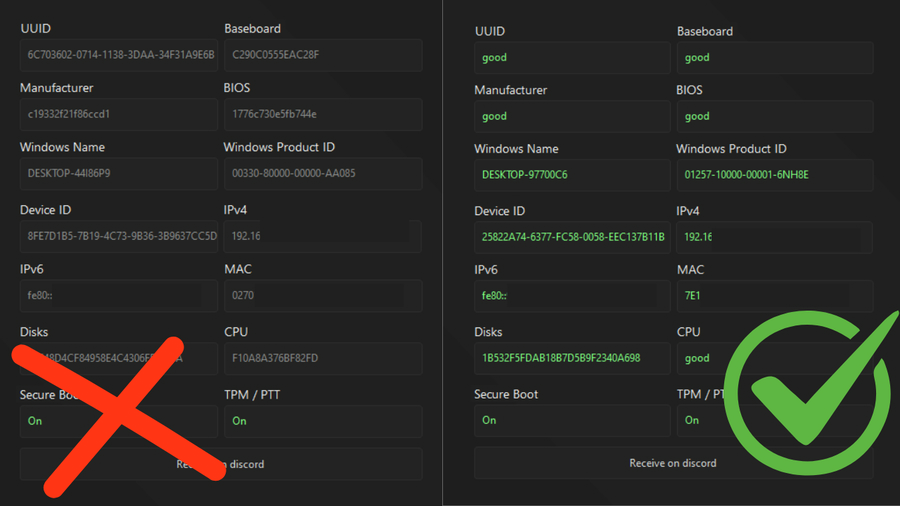 If any are red, please consult support
***
### 8. Spoof MAC-Address
Open the spoofer again, go to the spoofer tab and click on the **MAC** button
When a messagebox appears, click **Yes**
Wait for the “DONE” message, then close the window.
***
### 9. Check Vanguard Bypass (Only for Vanguard)
Please check if everything is still like its supposed to be, otherwise you will get baned again!
#### IF AMD BIOS:
{% tabs %}
{% tab title="AMD BIOS" %}
* DISABLE TPM 2.0 (Trusted Platform Module)
* DISABLE Trusted Computing
* DISABLE Secure Boot **and restore/install all secure boot keys**
* DISABLE HVCI AND VIRTUALIZATION (SVM)
{% endtab %}
{% tab title="INTEL BIOS" %}
* DISABLE PTT (Intel Platform Trust Technology) / TPM
* DISABLE Trusted Computing / Intel Trust
* DISABLE Secure Boot **and restore/install all secure boot keys**
* DISABLE HVCI AND VIRTUALIZATION (SVM)
{% endtab %}
{% endtabs %}
After disabling all these, open the loader before opening Valorant, log in, go to the Spoofer tab and select “Bypass”. Then click on bypass. after the bypass is open, open Valorant only when the bypass asks you to.
**!!! Be careful not to close the bypass when you are closing the game. Once it detects that the game has been closed, it will close automatically !!!**
Check your “**tpm.msc**” for an error like this
If any are red, please consult support
***
### 8. Spoof MAC-Address
Open the spoofer again, go to the spoofer tab and click on the **MAC** button
When a messagebox appears, click **Yes**
Wait for the “DONE” message, then close the window.
***
### 9. Check Vanguard Bypass (Only for Vanguard)
Please check if everything is still like its supposed to be, otherwise you will get baned again!
#### IF AMD BIOS:
{% tabs %}
{% tab title="AMD BIOS" %}
* DISABLE TPM 2.0 (Trusted Platform Module)
* DISABLE Trusted Computing
* DISABLE Secure Boot **and restore/install all secure boot keys**
* DISABLE HVCI AND VIRTUALIZATION (SVM)
{% endtab %}
{% tab title="INTEL BIOS" %}
* DISABLE PTT (Intel Platform Trust Technology) / TPM
* DISABLE Trusted Computing / Intel Trust
* DISABLE Secure Boot **and restore/install all secure boot keys**
* DISABLE HVCI AND VIRTUALIZATION (SVM)
{% endtab %}
{% endtabs %}
After disabling all these, open the loader before opening Valorant, log in, go to the Spoofer tab and select “Bypass”. Then click on bypass. after the bypass is open, open Valorant only when the bypass asks you to.
**!!! Be careful not to close the bypass when you are closing the game. Once it detects that the game has been closed, it will close automatically !!!**
Check your “**tpm.msc**” for an error like this
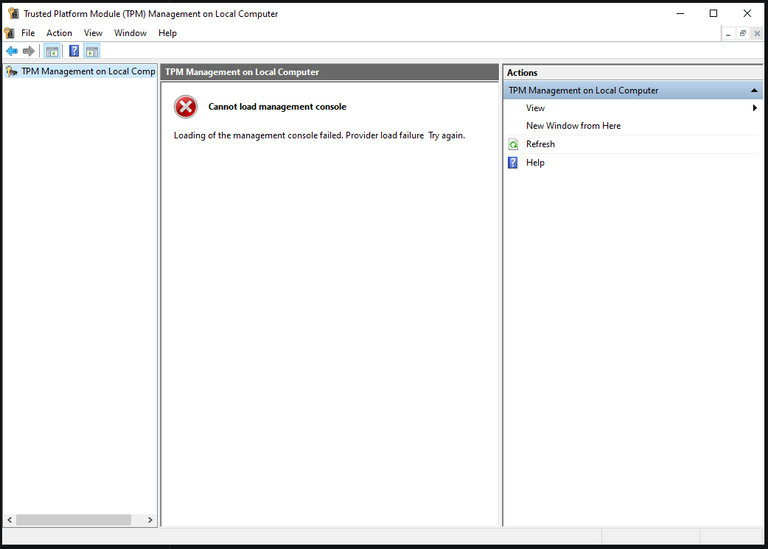 If you get the error, you can open valorant and play
***
### 10. Disable fast startup
Watch the video how to disable fast startup:
{% embed url="" %}
***
---
# Agent Instructions: Querying This Documentation
If you need additional information that is not directly available in this page, you can query the documentation dynamically by asking a question.
Perform an HTTP GET request on the current page URL with the `ask` query parameter:
```
GET https://stealthcore.gitbook.io/spoofer-tutorial/phantomspoofer-guide/vanguard.md?ask=
```
The question should be specific, self-contained, and written in natural language.
The response will contain a direct answer to the question and relevant excerpts and sources from the documentation.
Use this mechanism when the answer is not explicitly present in the current page, you need clarification or additional context, or you want to retrieve related documentation sections.
If you get the error, you can open valorant and play
***
### 10. Disable fast startup
Watch the video how to disable fast startup:
{% embed url="" %}
***
---
# Agent Instructions: Querying This Documentation
If you need additional information that is not directly available in this page, you can query the documentation dynamically by asking a question.
Perform an HTTP GET request on the current page URL with the `ask` query parameter:
```
GET https://stealthcore.gitbook.io/spoofer-tutorial/phantomspoofer-guide/vanguard.md?ask=
```
The question should be specific, self-contained, and written in natural language.
The response will contain a direct answer to the question and relevant excerpts and sources from the documentation.
Use this mechanism when the answer is not explicitly present in the current page, you need clarification or additional context, or you want to retrieve related documentation sections.